
Executive Summary
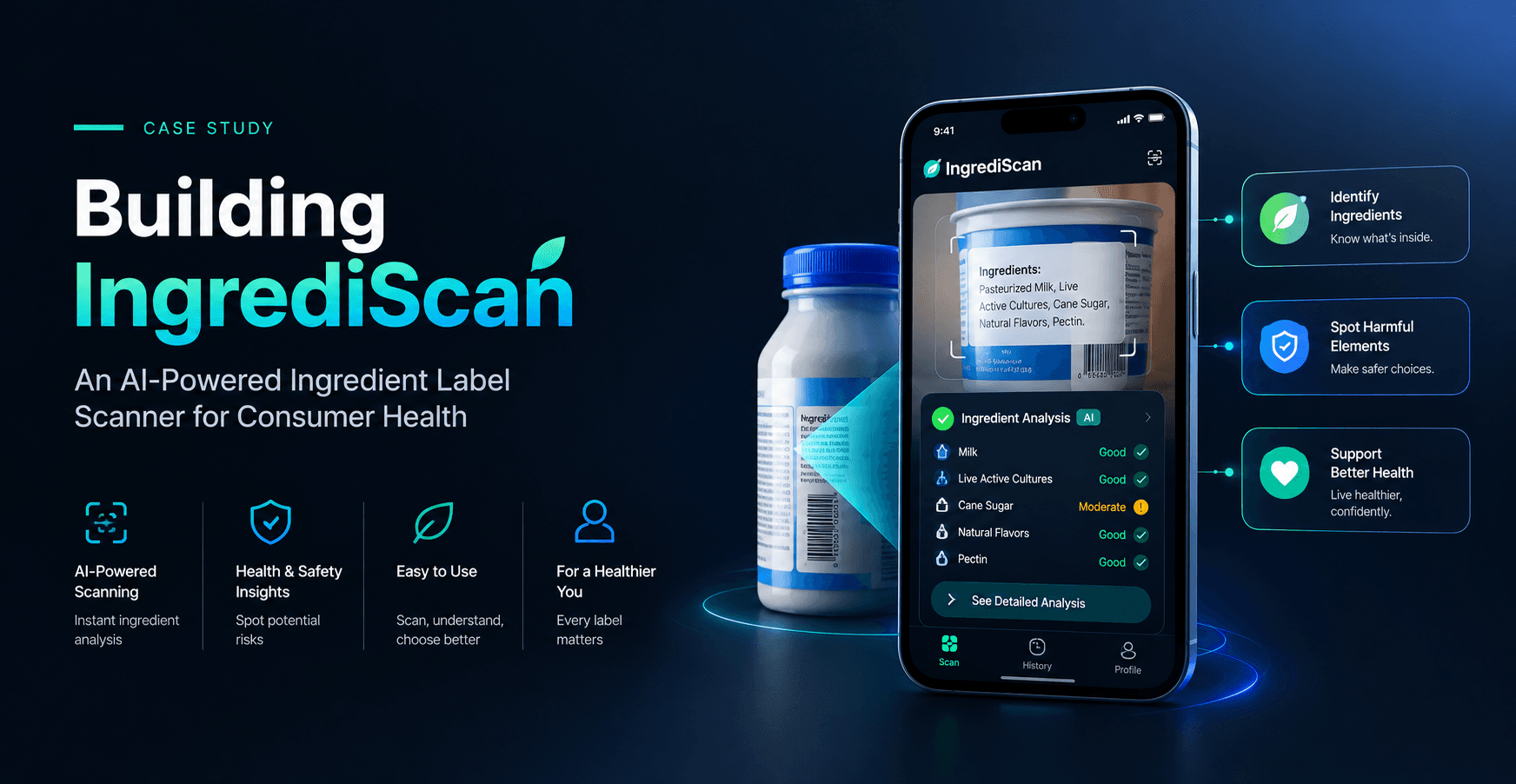
A confidential consumer health and nutrition technology client partnered with Meritorious CodeCrafters to build IngrediScan, a full-stack, cross-platform mobile application that helps everyday consumers understand what's actually in their packaged food. Users photograph or upload an ingredient label, and the app runs OCR and AI-powered analysis to return a color-coded A–E health grade, a NOVA processing-level classification, and a per-ingredient breakdown tagged Good, Neutral, or Avoid. Meritorious CodeCrafters delivered a React Native / Expo mobile app paired with a Python/FastAPI backend, integrating a provider-agnostic vision LLM pipeline that turns a simple photo into a structured, actionable health assessment - with both guest and authenticated usage supported out of the box.
Client Overview
Confidential Client - Consumer Health & Nutrition Technology Sector
The client is building consumer-facing technology aimed at closing the information gap between packaged food labels and the people trying to make informed decisions about what they eat. The target audience is everyday consumers who want fast, understandable answers about ingredient quality without needing to interpret dense nutrition science themselves. Due to a confidentiality agreement, the client's name and specific brand identity are withheld in this case study.
Business Challenge
Ingredient labels on packaged food are technically accurate but rarely accessible to the average consumer. The client identified a clear gap in the market:
- Ingredient lists use technical or unfamiliar terminology that most consumers can't quickly interpret
- There's no simple, at-a-glance way to judge whether a product is genuinely healthy or heavily processed
- Consumers have no easy way to compare a product against recognized standards like FSSAI or WHO guidance
- Most nutrition apps require manual data entry rather than instant, image-based analysis
- Trusted health-decision tools need to work without forcing users through account creation first
The client needed a mobile-first product that could take a single photo of an ingredient label and return an instant, understandable, standards-informed verdict - accessible to logged-in users and first-time guests alike.
Project Objectives
- Build a cross-platform mobile app (Android, iOS, Web) for scanning ingredient labels via camera or gallery
- Implement an AI-powered analysis pipeline combining OCR and LLM-based ingredient interpretation
- Return a clear, color-coded A–E health grade and NOVA processing-level classification for each scan
- Classify individual ingredients as Good, Neutral, or Avoid with supporting rationale
- Support both guest usage and full JWT-authenticated accounts with synced scan history
- Provide standards context by comparing products against FSSAI and WHO guidance
- Build a provider-agnostic AI backend so the underlying LLM provider can be swapped without code changes
- Deliver a persistent scan history so users can revisit past results
Solution
Meritorious CodeCrafters designed and built IngrediScan as a full-stack, cross-platform application, connecting a React Native / Expo mobile frontend to an asynchronous FastAPI backend powered by a provider-agnostic vision LLM pipeline.
Onboarding and Access
On launch, the app checks secure storage for a saved JWT token - if one exists, the user is taken straight to the dashboard; if not, they see a welcome screen with options to sign in, create an account, or continue in Guest Mode. This lets first-time users get value from the product immediately, without the friction of forced registration, while still offering full authenticated accounts with synced history for returning users.
Scan Capture and Upload
From the dashboard, users tap "Scan Product," then capture a photo or select one from their gallery using Expo's image picker. The image is sent as multipart form-data to the backend's upload endpoint, optionally carrying a bearer token if the user is logged in, so both guest and authenticated scans flow through the same pipeline.
AI-Powered Analysis Pipeline
On the backend, the uploaded image is validated and saved to storage, then base64-encoded and sent to a vision-capable LLM (Groq, OpenAI, or Gemini, depending on configuration) along with a structured prompt. The model returns structured JSON containing the product name, an A–E grade, a NOVA processing level, a full ingredient list with classifications, and a plain-language summary. This structured result is persisted to the database as linked Scan and Ingredient records, keeping analysis history queryable and consistent.
Scan Detail and Results Display
The app renders the returned analysis on a dedicated Scan Detail screen: a color-coded grade badge, a rationale summary, the product photo, and a filterable ingredient list that lets users toggle between All, Avoid, Neutral, and Good - making it easy to jump straight to the ingredients that matter most to a given user.
Scan History
Every scan - guest or logged-in - is retrievable through paginated history and detail endpoints, letting users revisit past results, compare products over time, or reference an earlier scan without rescanning the label.
Standards Comparison and Engagement Features
Beyond the core scanning flow, the Home tab includes a side-by-side comparison of FSSAI and WHO standards, along with a daily food trivia carousel and diet tips, giving the app an ongoing reason for users to return beyond single scan sessions. The profile experience includes twelve selectable food-emoji avatars, procedurally rendered as vector graphics rather than static image assets.
Provider-Agnostic AI Backend
The AI integration was built around the OpenAI SDK interface in a provider-agnostic way, allowing the team to switch between Groq, OpenAI, or Gemini through a single environment variable change with no code edits required - giving the client flexibility to optimize for cost, latency, or accuracy without re-engineering the analysis pipeline.
Technology / Expertise
Frontend (Mobile App):
- Framework: React Native / Expo (SDK 54) - cross-platform for Android, iOS, and Web
- Language: JavaScript (ES6+), React 19.1, functional components and hooks
- Secure Storage: expo-secure-store for encrypted JWT/token storage with memory fallback
- Camera/Media: expo-image-picker for camera capture and gallery selection
- Layout: React Native StyleSheet with SafeAreaContext for notch-safe native layout
- Animations: React Native Animated for scanner and logo animations
- Networking: fetch API for REST and multipart form-data requests
- Build/Deploy: EAS (eas-cli) for Android APK and iOS builds
Backend (API Server):
- Language: Python 3.12+, async-first
- Web Framework: FastAPI 0.115 with automatic OpenAPI docs and Pydantic validation
- Server: Uvicorn with uvloop for high-throughput ASGI performance
- ORM / Database: SQLAlchemy 2.0 (async), SQLite for development, PostgreSQL for production
- Auth: PyJWT with Argon2id (argon2-cffi) for secure password hashing and bearer tokens
- AI Integration: OpenAI SDK used in a provider-agnostic pattern, compatible with Groq, OpenAI, or Gemini
- Migrations: Alembic, production-ready for schema changes
Core Data Model: Users have many Scans (with nullable user_id to support guest scans); each Scan has many Ingredients with cascade delete; Scans store image URL, product name, grade, NOVA level, and summary; Ingredients store name, classification, and description.
Implementation Process
01. Discovery and Architecture
Meritorious CodeCrafters worked with the client to define the end-to-end flow: photo capture, AI-driven OCR and analysis, structured grading, and a filterable results experience, architected as a cross-platform mobile app backed by an async FastAPI service.
02. Backend Data Model and Auth
The team built the SQLAlchemy data model covering users, scans, and ingredients, along with JWT-based authentication using Argon2id password hashing, supporting both guest and authenticated scan flows from the ground up.
03. AI Analysis Pipeline
The vision LLM integration was built around a provider-agnostic pattern using the OpenAI SDK interface, with structured prompting designed to reliably return product name, A–E grade, NOVA level, ingredient classifications, and summary as structured JSON.
04. Core API Endpoints
Endpoints for registration, login, scan upload, and scan history (list and detail, paginated) were built and connected to the AI pipeline and database layer.
05. Mobile App Frontend
In parallel, the React Native / Expo app was developed, covering the welcome/auth flow, camera and gallery capture, the Scan Detail screen with filterable ingredient views, and the profile and Home tab experiences including standards comparison and trivia.
06. Cross-Platform Build and Packaging
The team configured EAS builds to produce a standalone Android APK, validating the packaged app outside the development environment.
07. Testing and Refinement
The application was tested end-to-end - from image capture through AI analysis to results rendering - to validate accuracy of structured LLM output and consistency of the grading and classification pipeline.
Key Features / Deliverables
- Cross-platform mobile app (Android, iOS, Web) built with React Native / Expo
- Camera and gallery-based ingredient label scanning
- AI-powered OCR and ingredient analysis via a provider-agnostic vision LLM pipeline
- Color-coded A–E health grading system
- NOVA processing-level classification
- Per-ingredient Good / Neutral / Avoid classification with rationale
- Filterable Scan Detail screen (All / Avoid / Neutral / Good)
- Guest Mode alongside full JWT-authenticated accounts
- Synced, paginated scan history for logged-in users
- FSSAI vs. WHO standards comparison on the Home tab
- Daily food trivia carousel and diet tips
- Twelve selectable, procedurally rendered food-emoji avatars
- Provider-agnostic AI backend (swap Groq / OpenAI / Gemini via a single .env change)
- Standalone, testable Android APK build
Challenges & Solutions
Building an AI-powered scanning app that works reliably across guest and authenticated users introduced several technical challenges the Meritorious CodeCrafters team had to design around:
Producing reliable structured output from a vision LLM.
Turning an arbitrary photo of an ingredient label into consistent, structured JSON - grade, NOVA level, per-ingredient classification, and summary - requires careful prompt design so the model's output can be reliably parsed and persisted every time, rather than occasionally returning malformed or inconsistent results.
Supporting guest and authenticated flows through the same pipeline.
Allowing scans without forcing account creation, while still supporting full synced history for logged-in users, meant designing the data model with a nullable user reference on scans from the outset, so both flows share the same upload and analysis pipeline without duplicated logic.
Avoiding lock-in to a single AI provider.
Vision LLM pricing, latency, and accuracy vary across providers. The team built the AI integration around the OpenAI SDK's interface in a provider-agnostic way, so the client can switch between Groq, OpenAI, or Gemini through configuration alone, keeping the product resilient to provider-side changes or cost shifts.
Keeping the mobile experience fast and native-feeling across platforms.
Camera capture, secure token storage, and multipart image uploads all needed to behave consistently across Android, iOS, and Web from a single React Native / Expo codebase, requiring careful use of platform-aware libraries like expo-secure-store and expo-image-picker.
Results
Meritorious CodeCrafters delivered a functional, production-ready core architecture for IngrediScan, including a standalone Android APK (approximately 57 MB) that is already built and testable outside the development environment. The delivered platform gives the client's users:
- Instant, photo-based ingredient label analysis with no manual data entry
- A clear, color-coded A–E health grade and NOVA classification for any scanned product
- Per-ingredient transparency through Good / Neutral / Avoid tagging with rationale
- The ability to use the app immediately via Guest Mode, with the option to create an account for synced history
- A cross-platform codebase ready for Android, iOS, and Web deployment
- An AI backend that isn't locked into a single LLM provider
Business Impact
By turning a single photo into an instant, understandable health verdict, IngrediScan removes the technical barrier that normally sits between a consumer and an informed purchasing decision. Guest Mode lowers the barrier to first use, letting the client's marketing drive users straight into value without a signup wall, while authenticated accounts with synced history give the product a natural path toward retention and repeat engagement. The provider-agnostic AI backend also protects the client's unit economics and product reliability, since the underlying vision LLM can be swapped as pricing, performance, or accuracy considerations change - without requiring further engineering work.
Why Meritorious CodeCrafters
Meritorious CodeCrafters brought together cross-platform mobile engineering and applied AI integration to deliver a consumer product where technical reliability directly affects user trust - a mis-parsed ingredient label or an inconsistent grade would undermine the entire premise of the app. Building a structured, provider-agnostic vision LLM pipeline behind a fast, native-feeling mobile experience reflects the AI-first, full-cycle product development approach Meritorious CodeCrafters applies across its mobile app development and AI development work.
Final Outcome
IngrediScan demonstrates how a well-scoped AI integration can turn a genuinely difficult consumer problem - interpreting technical ingredient labels - into a single photo and an instant, understandable answer. Meritorious CodeCrafters delivered a functional, production-ready cross-platform application, complete with a tested Android APK build, giving the client a strong foundation to launch and scale a consumer health product grounded in reliable, provider-agnostic AI infrastructure.
Call to Action
Looking to bring AI-powered analysis into your own consumer mobile app? Contact Meritorious CodeCrafters to discuss your mobile app development or AI development project.
FAQs
What does IngrediScan do?
IngrediScan lets users photograph or upload a packaged food ingredient label and returns an instant, color-coded A–E health grade, a NOVA processing-level classification, and a breakdown of ingredients tagged Good, Neutral, or Avoid.
Do users need to create an account to use IngrediScan?
No. IngrediScan supports Guest Mode, letting users scan and view results immediately without registering. Creating an account adds synced scan history across sessions and devices.
What AI technology powers IngrediScan's analysis?
IngrediScan uses a provider-agnostic vision LLM pipeline compatible with Groq, OpenAI, or Gemini. The uploaded image is analyzed and returned as structured data including grade, NOVA level, and per-ingredient classification.
What is the NOVA classification shown in IngrediScan?
NOVA is a food classification system describing how processed a product is. IngrediScan includes a product's NOVA level alongside its health grade to give users a fuller picture beyond a single score.
Is IngrediScan available on both Android and iOS?
IngrediScan is built with React Native / Expo for cross-platform support across Android, iOS, and Web. A standalone Android APK build has already been produced and tested.
How does IngrediScan compare products to nutrition standards?
The app's Home tab includes a side-by-side comparison of FSSAI and WHO guidance, giving users additional standards-based context alongside each scan result.