KEY TAKEAWAYS
- Building an AI agent works best as seven staged steps, from use case selection to monitored deployment, rather than as one build sprint.
- The best first use case is repetitive, multi-step, measurable, and forgiving of occasional errors; avoid irreversible actions until the agent has earned trust.
- Data readiness decides timelines: current knowledge, scoped API access, and clean retrieval sources matter more than the choice of framework.
- An evaluation set of 50 to 100 real tasks, rerun after every change, is the most reliable way to catch regressions before users do.
- A focused pilot with three to five tools typically takes six to twelve weeks, and ongoing maintenance belongs in the plan from day one.
Knowing how to build an AI agent for business is less about picking a framework and more about following a disciplined sequence. Teams that treat Advanced AI Agent Development as a staged process, with a clear use case, ready data, and tested behaviour, reach production far more reliably than teams that start from a demo.
An AI agent is software that uses a large language model to pursue a goal across several steps, calling tools and APIs, checking results, and adjusting course. This guide walks through seven steps from use case to production, with checklists you can apply to a first pilot.
What Are the Steps to Build an AI Agent?
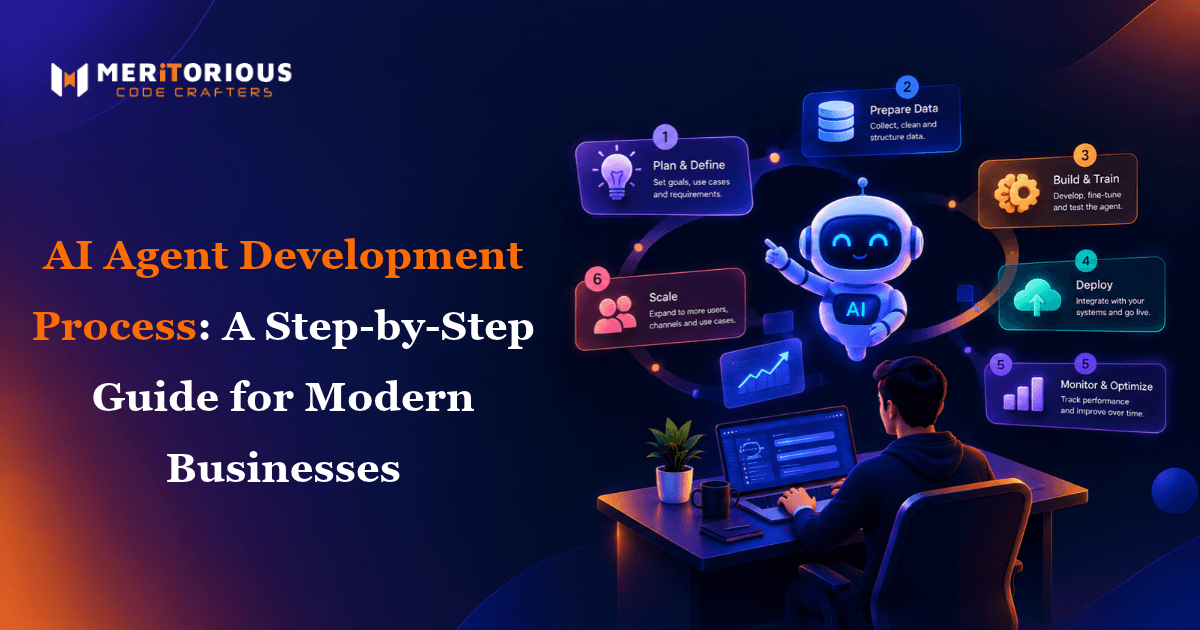
Building an AI agent follows seven steps: choose a use case, define scope and success metrics, check data readiness, design the architecture, build and integrate, test and evaluate, then deploy and iterate. The table summarises each step.
| Step | Goal | Indicative Time | Key Output |
|---|---|---|---|
| 1. Use case | Pick a high-value, low-risk task | 1 week | Ranked shortlist |
| 2. Scope and metrics | Set boundaries and targets | 1 week | Scope document, baseline |
| 3. Data readiness | Confirm data and access | 1–3 weeks | Data and access audit |
| 4. Architecture | Choose model, tools, orchestration | 1–2 weeks | Design document |
| 5. Build and integrate | Create the working agent loop | 3–6 weeks | Working prototype |
| 6. Test and evaluate | Prove reliability | 2–3 weeks | Evaluation report |
| 7. Deploy and iterate | Release safely and improve | 1–2 weeks, then ongoing | Production agent |
Timings are indicative for a focused pilot and shift with data quality and the number of integrations.
The AI Agent Development Process, Step by Step
Step 1: Choose a Use Case Worth Automating
Start with a task that is repetitive, multi-step, and valuable, but forgiving of occasional errors. Strong first candidates include research briefs, support ticket triage, document processing, and lead enrichment. Avoid irreversible or high-stakes actions, such as payments or contract changes, until the agent has proved itself in lower-risk work. A good use case has:
- A clear start and end point
- Data and APIs the agent can reach
- A measurable payoff, such as hours saved
- A safe fallback to a human
Step 2: Scope the Project and Define Success Metrics
Write down what the agent receives, which actions it may take, what it must produce, and where it must stop. Then define metrics before building: task completion rate, accuracy, time saved per task, cost per task, and escalation rate. Capture today's manual baseline so improvement can be proved rather than assumed. As an illustrative target, a support triage agent might aim for 80% correct routing and a 40% cut in handling time.
Step 3: Check Data Readiness
An agent is only as good as the information it can reach. Use this data readiness checklist:
- Is the knowledge the agent needs current, accurate, and documented?
- Do the required systems expose APIs, with permissions scoped to the task?
- Is sensitive or regulated data identified and handled correctly?
- For retrieval-augmented generation, are documents cleaned, chunked, and indexed?
Legacy systems and fragmented cloud estates often complicate this step. Teams facing that complexity can explore enterprise IT consulting solutions before committing to a build. Run this audit with the people who own the data, since gaps are usually organisational rather than technical.
Step 4: Design the Architecture
An AI agent combines a large language model for reasoning, a tool set, memory, and a planning loop. Frameworks such as LangChain simplify tool integration, while LangGraph suits stateful workflows with branching and retries. Begin with a single agent and a small tool set, add human approval for risky actions, and define what the agent must never do. Match the model to the task: a smaller, cheaper model often handles routine steps, while complex reasoning may justify a larger one.
It also helps to see how agents sit alongside other capabilities, and Artificial Intelligence Solutions provides useful context for that wider roadmap.
Step 5: Build and Integrate
Build the smallest working loop first: one goal, two or three tools, one successful run. Each tool needs a clear schema, authentication, error handling, and rate-limit awareness, because API integration is where most build time goes. Version your prompts, and use retrieval-augmented generation so answers draw on approved sources rather than model memory. Add guardrails at this stage, not later: input validation, output checks, and permission limits that stop the agent acting beyond its brief.
Step 6: Test and Evaluate
Create an evaluation set of 50 to 100 real tasks with known good outcomes, and rerun it after every change to prompts, tools, or models. Test failure modes deliberately:
- A tool times out or returns unexpected data
- Requests are ambiguous or incomplete
- Inputs try to push the agent outside its limits
- Results contradict each other across sources
Add human review of a sample of outputs, since automated scores miss errors of tone and judgement.
Step 7: Deploy, Monitor, and Iterate
Release in stages: shadow mode first, then human-approved actions, then autonomy for low-risk tasks. Log every reasoning step and tool call, track cost per task, and review failures weekly. Plan ongoing maintenance, because model updates and changing third-party APIs will break things that worked last month. Keep a rollback plan so you can revert to the previous version, or to manual handling, within minutes if quality drops.
Building something along these lines?
Tell us what you have in mind. We will come back with scope, stack and a realistic timeline.
What Does a Production-Ready AI Agent Include?
A production-ready agent is more than a prompt and a model. It includes these components:
- Reasoning model: a large language model chosen for task complexity and cost.
- Tools and API integration: defined functions with schemas, authentication, and error handling.
- Memory and retrieval: session context plus retrieval-augmented generation for approved knowledge.
- Guardrails: input validation, output checks, and permission limits.
- Logging and cost tracking: traces of each step so failures can be diagnosed.
How Long Does It Take to Build an AI Agent?
A focused pilot with three to five tools typically takes six to twelve weeks from scoping to production, as the table above shows. Data readiness and integration count cause the biggest swings. Broader rollouts take longer, and teams planning that scale canbuild custom AI solutions for your enterprise using a structured roadmap rather than ad hoc pilots. Budget extra time if approvals, security reviews, or vendor access requests sit outside your team's control.
AI Agent Pilot Project Checklist
Before launch, confirm each of these:
- Use case approved, with a named business owner
- Success metrics and baseline recorded
- Data access and permissions verified
- Evaluation set built and passing its threshold
- Human approval set for high-risk actions
- Logging, cost tracking, and alerts live
- Rollback and escalation paths documented
- Maintenance owner assigned
Common Mistakes to Avoid
- Starting with the framework: choose the problem first; tools follow.
- Skipping the evaluation set: without it, regressions reach users unnoticed.
- Too many tools too soon: each added tool multiplies failure modes.
- No human approval: risky actions need a checkpoint until trust is earned.
- Ignoring maintenance: agents degrade as models and APIs change.
Conclusion: Build in Stages, Prove Value Early
The most reliable way to build an AI agent is to move in stages, proving value at each one. Pick a safe use case, define success, prepare the data, test against real tasks, and release gradually.
If you want an experienced partner for the process, Meritorious CodeCrafters can guide you from scoping to production. To discuss your use case, Let's Build Your Solution Together.
Frequently Asked Questions
1. How do I build an AI agent for my business step by step?
Choose a low-risk, repetitive use case, define scope and success metrics, check data readiness, design the architecture, build and integrate the tools, test against real tasks, then deploy in stages and keep iterating.
2. How do I choose a use case for an AI agent?
Look for tasks that are repetitive, multi-step, measurable, and tolerant of occasional errors, with data and APIs the agent can reach. Avoid irreversible actions in the first pilot.
3. How long does AI agent development take?
A focused pilot with three to five tools typically takes six to twelve weeks. Data readiness, the number of integrations, and testing depth are the main factors that move the timeline.
4. Do I need LangChain or LangGraph to build an AI agent?
No. They are useful frameworks, with LangChain easing tool integration and LangGraph handling stateful workflows, but a simple agent can be built without them. Choose a framework only after the use case and architecture are clear.
5. How do I define success metrics for an AI agent?
Pick measurable outcomes tied to the task, such as completion rate, accuracy, time saved, cost per task, and escalation rate. Record a manual baseline before launch so you can compare results honestly.