A good chatbot feels effortless to use. Behind that simplicity is a structured, step-by-step process.
This guide walks through the AI chatbot development process from start to finish. Whether you're planningEnterprise AI Chatbot Developmentor a smaller business assistant, understanding each step helps you launch a chatbot that actually helps users.
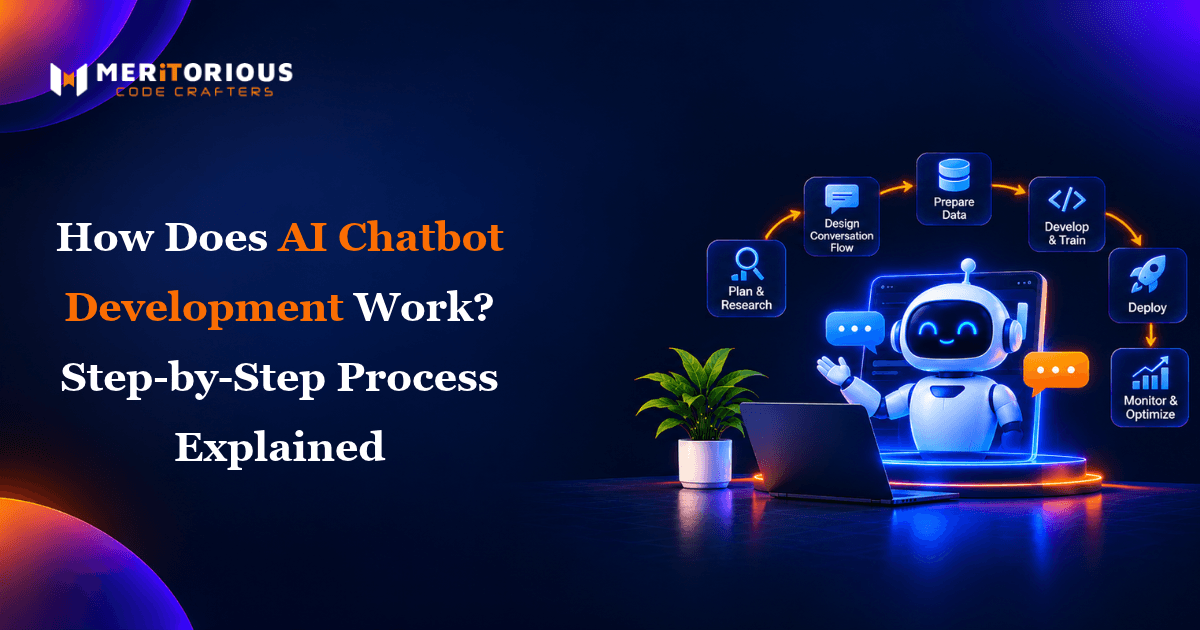
Quick Answer: The AI chatbot development process typically follows ten steps: discovery, conversation design, intent mapping, training data preparation, knowledge base setup, choosing the technology stack, building a prototype or MVP, testing and QA, deployment, and ongoing monitoring and optimization. Each step builds on the last, so skipping early planning usually causes problems later.
How AI Chatbot Development Works: An Overview
Modern chatbots combine several technologies:
- Natural language processing (NLP) to process human language
- Natural language understanding (NLU) to interpret meaning and intent
- Large language models (LLMs) to generate natural, flexible responses
- Retrieval-Augmented Generation (RAG) to answer from approved company content
How AI chatbots are built depends on the goal. Some rely on structured intent flows built with Dialogflow or Rasa. Others use LLMs through the OpenAI API for open-ended conversations. Many combine both.
If you're new to the topic, start withwhat is AI chatbot developmentbefore diving into the steps below.
Step-by-Step AI Chatbot Development
Step 1: Chatbot Discovery and Requirement Gathering
Every successful project starts with clear answers to these questions:
- What problem should the chatbot solve?
- Who will use it, and where (website, app, internal portal)?
- Which tasks should it handle, and which should go to humans?
- How will success be measured?
How to define chatbot goals and use cases before development: Start with a few high-volume, well-defined tasks, like answering common questions or tracking orders. Narrow goals mean faster launches.
Step 2: Chatbot Conversation Design Process
Conversation design shapes how the chatbot talks and behaves. This step defines:
- The chatbot's tone and personality
- Greetings, prompts, and responses
- How it handles confusion or off-topic questions
- When and how it hands over to a human
Designers map flows for common scenarios and edge cases, with clear fallbacks to prevent dead ends.
Step 3: Chatbot Intent Mapping
Intent recognition helps the chatbot understand what users want. Chatbot intent mapping groups user messages by purpose, such as "check order status," "reset password," or "request refund."
For each intent, the team defines:
- Example user phrases
- Required details (entities), like order numbers or dates
- The correct response or action
Even LLM-based chatbots benefit from intent mapping.
Step 4: Chatbot Training Data Preparation
How to train an AI chatbot on company data: Gather the content the chatbot needs, such as FAQs, product information, policies, and past support conversations. Then clean it by removing outdated details, duplicates, and contradictions.
Good training data reflects how real users speak, typos included.
Step 5: Chatbot Knowledge Base Setup
Chatbot knowledge base setup organizes approved content so the chatbot can find accurate answers. With RAG, the chatbot searches this knowledge base before responding, keeping answers grounded in your own information.
Key tasks include:
- Structuring content by topic
- Setting access rules for sensitive information
Step 6: Choose the Technology Stack
The right stack depends on your goals:
| Approach | Best For | Example Tools |
|---|---|---|
| Intent-based | Predictable, structured tasks | Dialogflow, Rasa |
| LLM-based | Open-ended, natural conversations | OpenAI API and other LLMs |
| Hybrid | Reliable flows plus flexible answers | Rasa or Dialogflow with an LLM |
Chatbot NLP Pipeline Stages
A typical chatbot NLP pipeline includes:
- Input processing: Cleaning and normalizing the user's message
- Intent recognition: Identifying what the user wants
- Entity extraction: Pulling key details from the message
- Context management: Remembering earlier parts of the conversation
- Response generation: Returning a scripted answer or LLM-generated reply
LLM-Based Chatbot Development Workflow
An LLM-based chatbot development workflow usually adds system prompts that define behavior, retrieval from the knowledge base, and guardrails that keep answers on-topic, safe, and on-brand.
Step 7: Chatbot Prototype and MVP Stage
Teams build a prototype or minimum viable product (MVP) covering the most important use cases. Internal users test it and reveal gaps early, when changes are easy.
Step 8: Chatbot Testing and QA Process
How to test chatbot conversation quality before launch:
- Test every key intent with varied phrasing
- Try unexpected, vague, and off-topic questions
- Check answer accuracy against the knowledge base
- Review tone, clarity, and brand consistency
- Confirm human handover works smoothly
Internal pilot conversations often uncover issues scripted tests miss.
Step 9: Chatbot Deployment Steps
Chatbot deployment steps typically include:
- Connecting the chatbot to its channels, such as your website or app
- Setting up analytics and conversation logging
- Launching to a small group of users first
- Expanding gradually as performance proves stable
Chatbot Launch Checklist
- [ ] Core intents tested and working
- [ ] Knowledge base reviewed and current
- [ ] Fallback and human handover configured
- [ ] Privacy and data handling confirmed
- [ ] Analytics and monitoring active
Step 10: Chatbot Post-Launch Monitoring and Optimization
Launch is the beginning, not the end. How to improve chatbot performance after launch:
- Review conversation logs for failed or confusing interactions
- Track resolution rate, handover rate, and user satisfaction
- Add new intents based on real questions
- Update the knowledge base as products and policies change
Building something along these lines?
Tell us what you have in mind. We will come back with scope, stack and a realistic timeline.
What Happens During Each Phase of Chatbot Development?
A quick summary of the AI chatbot development phases:
| Phase | Main Output |
|---|---|
| Discovery | Goals, use cases, success metrics |
| Design | Conversation flows, tone, fallbacks |
| Data and knowledge | Clean training data and knowledge base |
| Build | Working prototype or MVP |
| Testing | Verified accuracy and conversation quality |
| Deployment | Live chatbot on chosen channels |
| Optimization | Continuous improvements from real usage |
For a deeper look at the full AI chatbot development lifecycle, explore ourAI chatbot development lifecycle guide.
How Businesses Plan and Launch an AI Chatbot
The chatbot development process for business works best when teams:
- Start with a narrow, high-value use case
- Keep content owners responsible for knowledge base accuracy
- Launch gradually and improve based on data
Experienced Remote AI Developers in India can help speed up building, testing, and optimization.
FAQs
What are the steps to develop an AI chatbot for a business?
The AI chatbot development process covers discovery, conversation design, intent mapping, data preparation, knowledge base setup, technology selection, prototyping, testing, deployment, and optimization.
How is an AI chatbot trained on company data?
By preparing clean FAQs, policies, and product content, then connecting it through a knowledge base, often using RAG.
What is intent mapping in chatbot development?
It groups user messages by purpose so the chatbot can recognize what users want and respond correctly.
How do you test a chatbot before launch?
Test key intents with varied phrasing, check answer accuracy, review tone, confirm human handover, and run internal pilot conversations.
How do you improve a chatbot after launch?
Review conversation logs, track resolution and satisfaction rates, add new intents, and keep the knowledge base current.
Conclusion
The AI chatbot development process turns a business goal into a helpful, reliable conversational experience. Clear planning, thoughtful design, clean data, thorough testing, and continuous optimization separate great chatbots from frustrating ones.
Ready to build your chatbot? Explore ourCustom AI & Digital Solutions orConnect with Our AI Specialists today.