A chatbot is only as useful as the systems it connects to. If it can't read your CRM, update an order, or hand off to a human, it becomes a dead end.
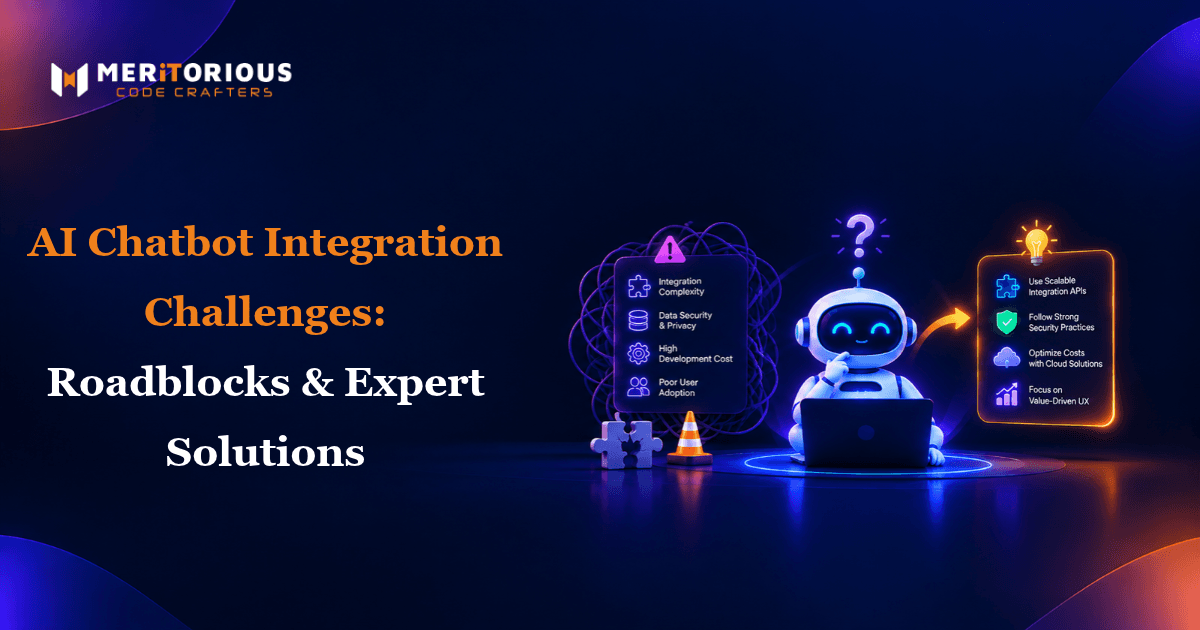
That's why AI chatbot integration challenges, not conversation design, are where most projects slow down. Even a well-built Custom AI Chatbot Development project can stall at the integration stage. This guide covers the most common roadblocks, why chatbot integrations break, and expert fixes for each.
Why Chatbot Integration With Existing Systems Is Difficult
Most businesses run on a mix of modern SaaS tools and older in-house software. A chatbot has to talk to all of them, often in real time.
Integration gets harder because:
- Systems weren't built to talk to each other: CRMs, ERPs, help desks, and databases each use different data formats and protocols.
- Data lives in many places: Customer details in Salesforce, tickets in Zendesk, orders in an ERP.
- Requirements surface late: Teams often discover integration needs after the bot is already designed.
Planning integrations early, during the right Stages of AI Chatbot Development, prevents most of these issues.
Top AI Chatbot Integration Problems and Solutions
1. Chatbot CRM Integration Issues
Connecting a chatbot to Salesforce or HubSpot sounds simple, but common problems include mismatched field mappings, duplicate contact records, and permission errors.
Solutions:
- Map every chatbot field to a CRM field before development starts.
- Match records on unique identifiers like email or customer ID to avoid duplicates.
- Use a dedicated integration user with only the permissions the bot needs.
2. Chatbot API Integration Challenges
Most chatbots rely on REST APIs to fetch and update data. Problems appear when APIs are slow, poorly documented, or change without notice. AI chatbot API rate limit issues are especially common. Platforms like Salesforce cap daily API requests, and a busy bot can hit those limits fast.
Solutions:
- Cache frequently requested, rarely changing data.
- Add retries with exponential backoff for failed or throttled calls.
- Version your API contracts so changes don't silently break the bot.
3. Legacy System Chatbot Integration
Older systems often lack modern APIs entirely. Chatbot integration with legacy ERP platforms is one of the main reasons AI chatbot integration fails with legacy software.
Solutions:
- Use chatbot middleware integration to translate between the bot and legacy systems.
- Expose only the legacy functions the bot actually needs.
- Start with read-only access before allowing the bot to write data.
4. AI Chatbot Data Synchronization Issues
When the chatbot shows an old order status or outdated account details, users lose trust immediately. Sync problems usually come from batch updates that run too infrequently.
How to keep chatbot data in sync with backend systems:
- Use real-time API calls for data that changes often, like orders and balances.
- Use webhooks to push updates to the bot instead of polling.
- Define a single source of truth for each data type.
5. Chatbot Webhook Integration Errors
Webhooks are powerful but fragile. Missed events, duplicate deliveries, and timeouts can quietly corrupt data.
Solutions:
- Make webhook handlers idempotent so duplicate events don't create duplicate records.
- Verify webhook signatures to confirm requests are genuine.
- Respond quickly and process heavy tasks asynchronously.
- Store failed events in a queue for replay.
6. Chatbot Knowledge Base Integration Problems
A chatbot connected to an outdated or messy knowledge base gives inaccurate answers. Retrieval-Augmented Generation (RAG) helps the bot answer from your approved content, but only if that content is clean.
Best way to connect an AI chatbot to a knowledge base and CRM:
- Remove duplicate and outdated articles before indexing.
- Re-index automatically whenever content changes.
- Combine knowledge base answers with CRM context for personalized responses.
7. AI Chatbot Authentication and Security Challenges
Chatbots often access sensitive customer and business data, which makes authentication critical.
How to secure AI chatbot integrations with enterprise data:
- Use OAuth 2.0 for secure, token-based access to connected systems.
- Implement chatbot single sign-on integration so logged-in users don't re-authenticate.
- Encrypt data in transit and at rest.
- Never expose API keys in client-side code.
8. AI Chatbot Data Privacy Compliance Integration
If your chatbot handles personal data from EU users, GDPR applies, with fines of up to €20 million or 4% of global annual turnover.
Solutions:
- Collect only the data the conversation truly needs.
- Mask or redact sensitive fields before storing transcripts.
- Support data access and deletion requests across every connected system.
9. AI Chatbot Human Handoff Integration
When a bot can't help, the handoff to a live agent must be seamless. A poor handoff forces users to repeat themselves.
Solutions:
- Integrate with help desks like Zendesk so conversations transfer with full context.
- Define clear handoff triggers, such as repeated failures or explicit requests.
10. AI Chatbot Omnichannel Integration Challenges
Customers expect the same experience on your website, app, and messaging channels. Each channel, including the WhatsApp Business API, has its own rules. WhatsApp, for example, limits free-form replies to a 24-hour window after the user's last message.
Solutions:
- Centralize conversation history so context follows users across channels.
- Use approved message templates for WhatsApp outreach.
Building something along these lines?
Tell us what you have in mind. We will come back with scope, stack and a realistic timeline.
AI Chatbot Scalability Issues and Deployment Roadblocks
A bot that works for 100 users may fail at 10,000. Common AI chatbot deployment roadblocks include overloaded APIs, slow database queries, and missing monitoring. To scale reliably, load-test integrations before launch, use queues for heavy tasks, and set alerts for failed API calls and response delays.
Chatbot Integration Testing Checklist
Before going live, test:
- Every CRM, API, and webhook connection
- Error handling when a connected system is down
- Data sync accuracy across systems
- Authentication, SSO, and permission limits
- Human handoff with full context
- Performance under peak load
- Privacy controls and data deletion
Common AI Chatbot Integration Mistakes
- Treating integration as an afterthought.
- Connecting directly to fragile legacy systems without middleware.
- Ignoring rate limits until production.
AI Chatbot Integration Best Practices
Start with the integrations that deliver the most value. Document every data flow, secure each connection, and monitor continuously. Understanding the full AI Chatbot Development Process helps you avoid integration delays in AI chatbot projects. Experienced Hire AI Engineers in India and Offshore Full Stack developers from India can also speed up complex backend and middleware work.
FAQs
1. How do you integrate an AI chatbot with existing business systems?
Map your data flows, connect systems through REST APIs or middleware, secure access with OAuth 2.0, and test every connection before launch.
2. Why do chatbot integrations break?
Most break due to API changes, rate limits, webhook errors, expired credentials, or unsynced data between systems.
3. How do you fix chatbot CRM and API integration errors?
Review field mappings, check permissions, add retry logic, and log every failed request to find the root cause.
4. Can a chatbot integrate with a legacy ERP?
Yes. Middleware or a custom API layer lets the chatbot communicate with legacy ERPs safely.
5. How long should chatbot integration testing take?
It depends on how many systems are connected, but test every connection, failure scenario, and peak-load case before go-live.
Conclusion
AI chatbot integration challenges are manageable with the right planning. Clean data, secure connections, reliable APIs, and thorough testing turn your chatbot into a connected part of your business. Need a partner for complex chatbot integrations? Meritorious CodeCrafterscan help. Start Your Project today.